FS App
Track progress.Stay connected.
The companion to your child’s (or your) learning—enrollments, class sessions, homework, feedback, payments, and the full curriculum path in one place. Built for families and students who want clarity, not guesswork.
Why families choose FS App
One app. The full story of learning—from this week’s lesson to the multi-year path ahead.
Manage
See payments, session credits, and how tuition maps to real classes.
Track
Grades, attendance, homework, and long-term progress on every course.
Enroll
View active and paused classes, schedules, teachers, and locations.
Connect
Teacher feedback, notifications, and community so nothing slips through.
Enrollments
Enrollments that match real life
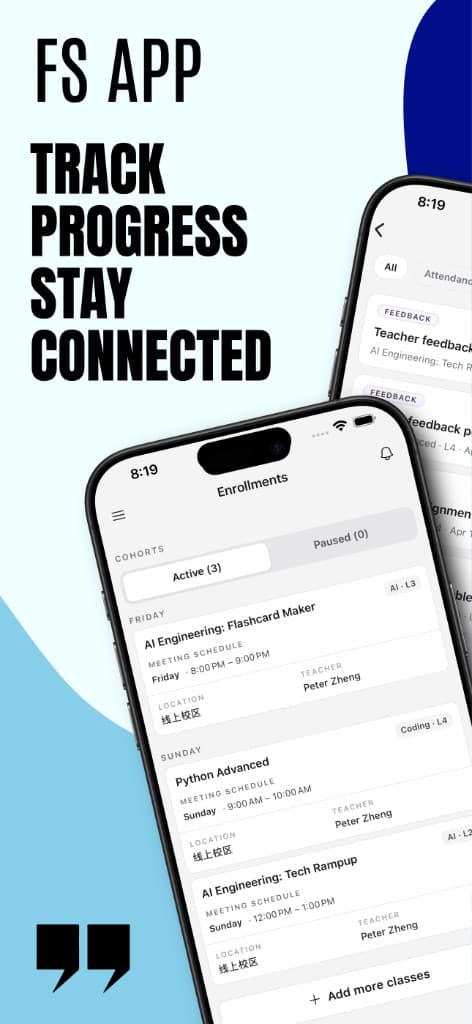
Your week at a glance: Active and Paused cohorts, classes grouped by day, and every card showing what matters—course name, track and level (e.g. AI · L3, Coding · L4), meeting time, teacher, and location (including online campus). Add more classes when you’re ready to grow the schedule.
Stays in sync with how your school or program actually runs—no more scattered calendars or one-off messages.
Every session
Stay in sync: homework, replay, and session evaluation
Open a session and you are not stuck with a vague "they had class today." Overview, submission history, and recording live in one place.
Homework includes time estimates, points, and clear titles and study-guide summaries. Session evaluation shows an overall star rating and criteria: participation, engagement, behavior, understanding, and work ethic—plus real teacher comments.
Perfect for checking "what was assigned?" and "how did class go?" on your own time.

The long view
Track their journey: curriculum path and pacing
The Curriculums view is a vertical roadmap: each level is a card in order, with L4 / L5 / L6 (or your program’s levels) visible at a glance. See what is completed, what is their current class, and what is next.
- Progress bars and attendance breakdowns: attended, make-up, still absent.
- Pace-based estimates: projected finish for the current course and for the full pathway—so you can plan with evidence, not only at report time.
For parents who want to see the arc, not just this month’s folder.

Course view
Follow their progress: grades, homework, and every session
Inside a course (e.g. Python Advanced · L4), you get overall performance, and breakdowns for attendance, homework (on time, late, absent), and feedback (graded items and comment counts).
Sessions and lessons list real topics—with statuses like taught, on time, replay available, and clear homework submission state.
Built for students who want to improve, and parents who want evidence—not vibes.

Manage. Track. Enroll. Connect.
Payments, credits, notifications, and community—one place to run school life alongside learning.
- Payments & credits — Tie a payment to which sessions used credits: date, topic, course, and credits in one list.
- Notifications — Filter by type (e.g. feedback, homework submit) and read the story in order.
- Community — Join the spaces that matter to your program so "connect" is not only email and group chats.


“We finally see the full arc—this week, this course, and what comes next. No more guessing if homework or credits line up with what we paid for.”
For international families
The app is designed to support bilingual and international use—English UI with local labels where your program needs them (for example, 线上校区 for online campus), so the same experience works across your student body.
Get started
Download FS App for iOS and sign in with your program account. Use the same account for the web when your school or program provides it.
FS App — the clearest view of class, curriculum, and progress, from today through the long path ahead.
Privacy PolicyUser privacy choices (U.S.)Any changes to these terms are released with your next app version, as shown in the App Store and on this site.